


Why Small-Order Quotes Need No Separate Surcharge Table: Dividing CM by the Costing Target
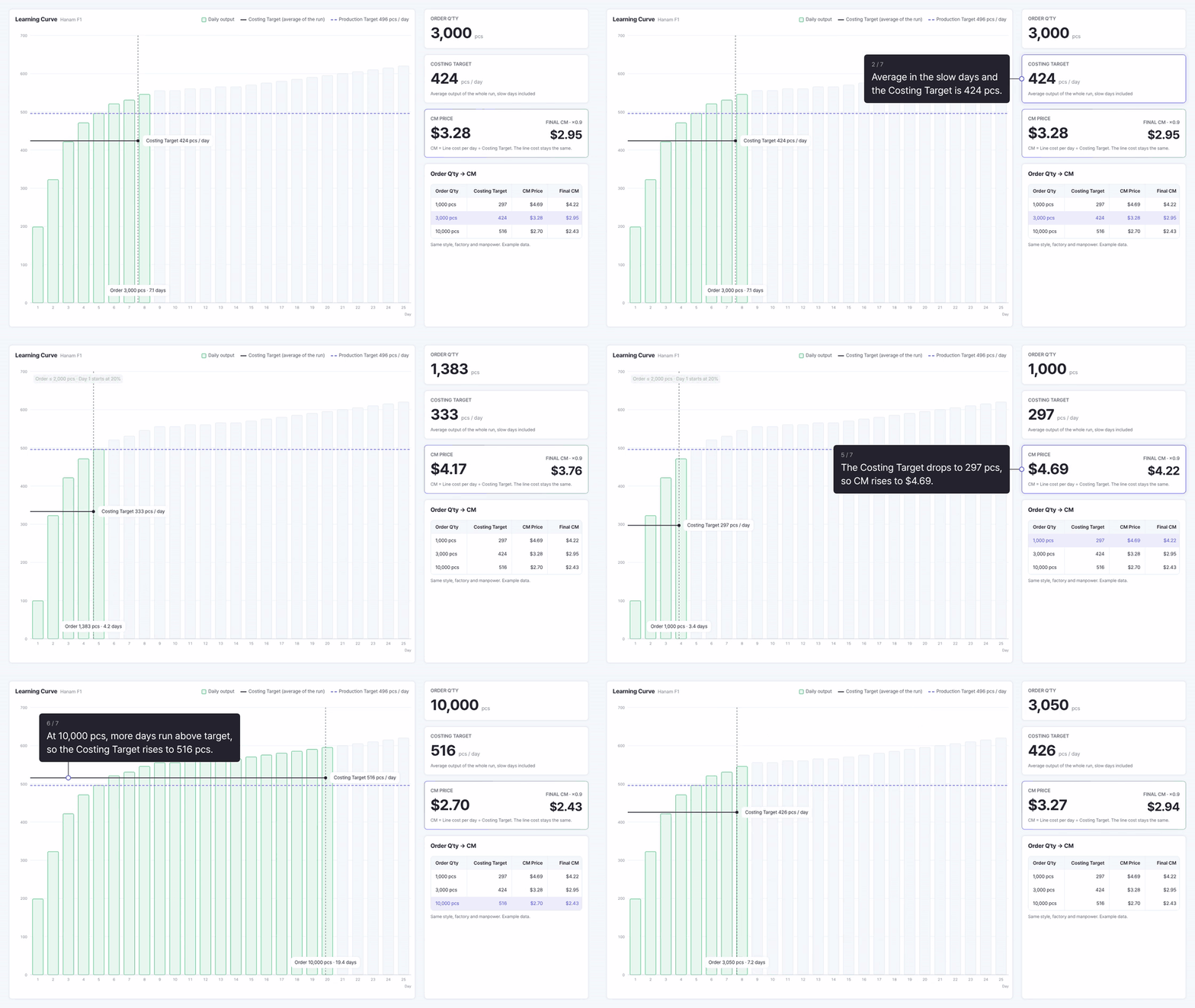
AI Process Analysis series · Supplement 3 · Small-order CM and the Costing Target
KEY POINTS
CM (Cut & Make) is the cost of running one factory line for a day divided by the number of pieces that line makes in a day. If that piece count is the Costing Target, the average daily output over the whole run including the slow days, instead of the Production Target, then the smaller the order, the lower the Costing Target and the higher the CM. The price increase for small orders comes out of the formula itself without a separate surcharge table, and its size is set by the order quantity and the learning curve.
The question small-order quotes raise
When a 1,000 pcs order and a 10,000 pcs order for the same style come into a sewing factory, most people agree that the CM per piece cannot be the same. A small order ends just as the line gets used to the style, and there is no time left to make up the pieces it fell short on.
The question is how much higher it should be. A common answer is a surcharge table with a rate for each quantity band. But when a buyer asks why the rate is that number, it is hard to answer, and the same table ends up applied to styles of different difficulty and to factories of different efficiency.
SIJE’s process analysis spreadsheet has no surcharge table. Even so, the CM for small orders goes up automatically. This article walks through how that calculation works. It first defines what CM divides by what, then looks at the numerator and the denominator one at a time, and finally checks which of the two changes when the order quantity changes. All screens and figures are example data.
CM is daily cost divided by daily output
CM (Cut & Make) is the processing fee a factory receives for taking in fabric, cutting it and sewing one finished garment. Fabric and trims are not included. It is the factory’s labor, equipment and overhead spread over each piece.
The skeleton of the calculation is simple. Divide the cost of running one line for a day by the number of pieces that line makes in a day, and you get the cost per piece.
CM = Daily cost of one line ÷ Pieces made per day
A restaurant is a handy comparison. With fixed daily running costs, a busy day puts a small share of those costs on each dish and a quiet day puts a large share on each dish. The running cost stays the same, and only the number of dishes it is divided by changes. A sewing line works the same way. The daily cost barely changes, and how many pieces the line makes in a day sets the cost per piece.
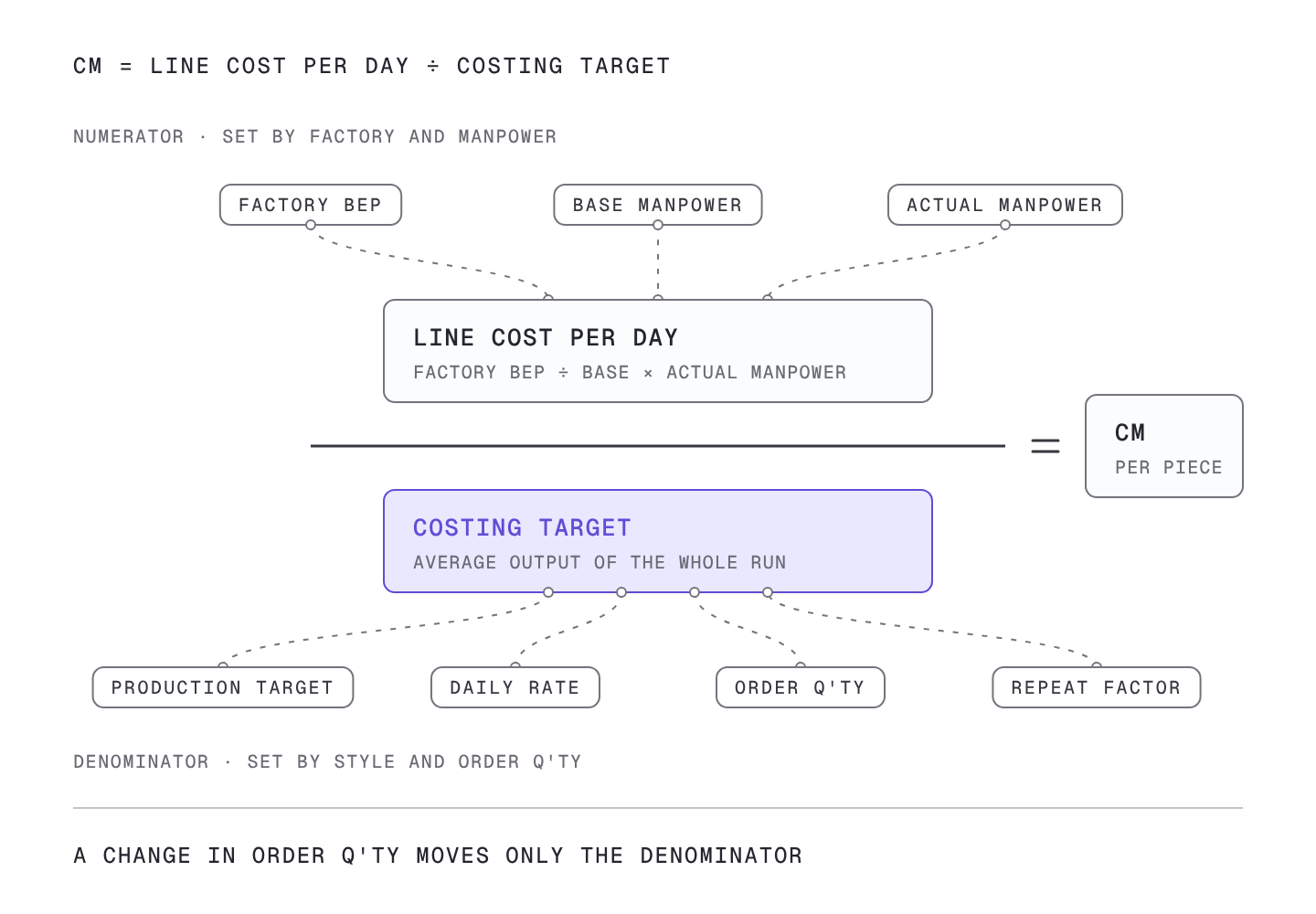
So to understand CM you need to look at the numerator and the denominator separately. The factory and its manpower set the numerator, and the style and the order quantity set the denominator.
Numerator: adjust the factory BEP to the actual manpower
The numerator uses the factory BEP. Here the factory BEP is the amount one line has to earn to break even when it runs for an 8-hour day. Labor and overhead differ by factory, so each factory has its own figure.
The factory BEP, however, assumes the line runs with the factory’s base manpower. A real style needs a different number of people depending on how many operations it has and how difficult they are. So the factory BEP is first divided into an amount per person of base manpower and then multiplied by the manpower this style actually needs.
Calculated BEP = Factory BEP ÷ Base manpower × Actual manpower
Manpower here is not only sewing operators. It includes helpers and the cutting, pressing and packing staff who support one line, because their time also goes into every finished piece.
For example, if a style has many operations and needs two more operators than the base manpower, two people’s worth of the per-person amount is added and the daily cost goes up by that much. A simpler style that needs fewer people lowers the daily cost. The original spreadsheet sums this up in one line: the factory BEP is adjusted by the factory’s manpower, not by the target. The numerator carries only the cost of people, and how many pieces get made is handled separately in the denominator.
Denominator: divide by the Costing Target, not the daily target
Which piece count goes into the denominator is the core of this article. The first number that comes to mind is the Production Target, the daily output when the line is fully used to the style and running at normal speed.
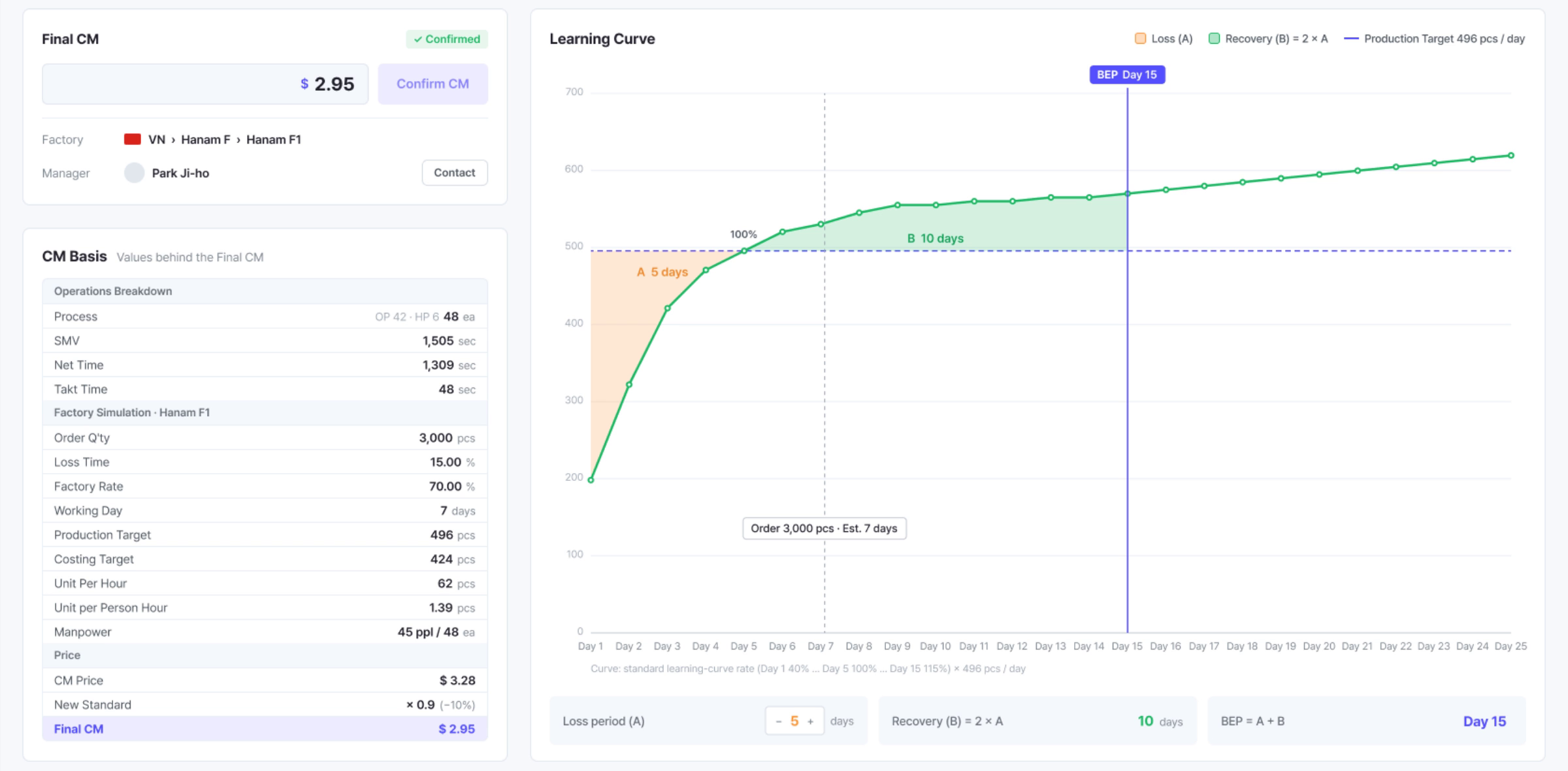
But as Supplements 1 and 2 showed, a line cannot make its Production Target from day one. It starts at 40%, reaches 100% only on day 5, and then runs slightly above target to make up what it missed earlier. Dividing by the Production Target leaves these slow days out of the calculation. The line spends the same daily cost on a slow day, yet the pieces it did not make that day appear nowhere in the calculation.
So the denominator uses the Costing Target, the average daily output over the whole order including the slow days.
CM = Calculated BEP ÷ Costing Target
The Monolis screen calculates the same way. On the result screen for example order DR-2026-001 (3,000 pcs), the Costing Target of 424 pcs sits next to the Production Target of 496 pcs, and the CM Price of $3.28 is the value divided by the Costing Target. Applying the standard adjustment (10% reduction, ×0.9) gives the final CM of $2.95.
When the order quantity changes, only the denominator changes
Now we can return to the opening question. Keep the same style, factory and manpower and change only the order quantity, and the difference is clear. The numerator is set by the factory and manpower, so it stays the same. What changes is the denominator, the Costing Target.
Below are the Costing Targets calculated in Supplement 1 with the same Production Target of 496 pcs, and the CM divided by each.
| Order Q’ty | Costing Target | CM Price | Final CM (×0.9) |
|---|---|---|---|
| 1,000 pcs | 297 pcs | $4.69 | $4.22 |
| 3,000 pcs | 424 pcs | $3.28 | $2.95 |
| 10,000 pcs | 516 pcs | $2.70 | $2.43 |
The 3,000 pcs row is the Monolis screen value, and the 1,000 pcs and 10,000 pcs rows are example calculations that divide the same daily line cost by each order’s Costing Target.
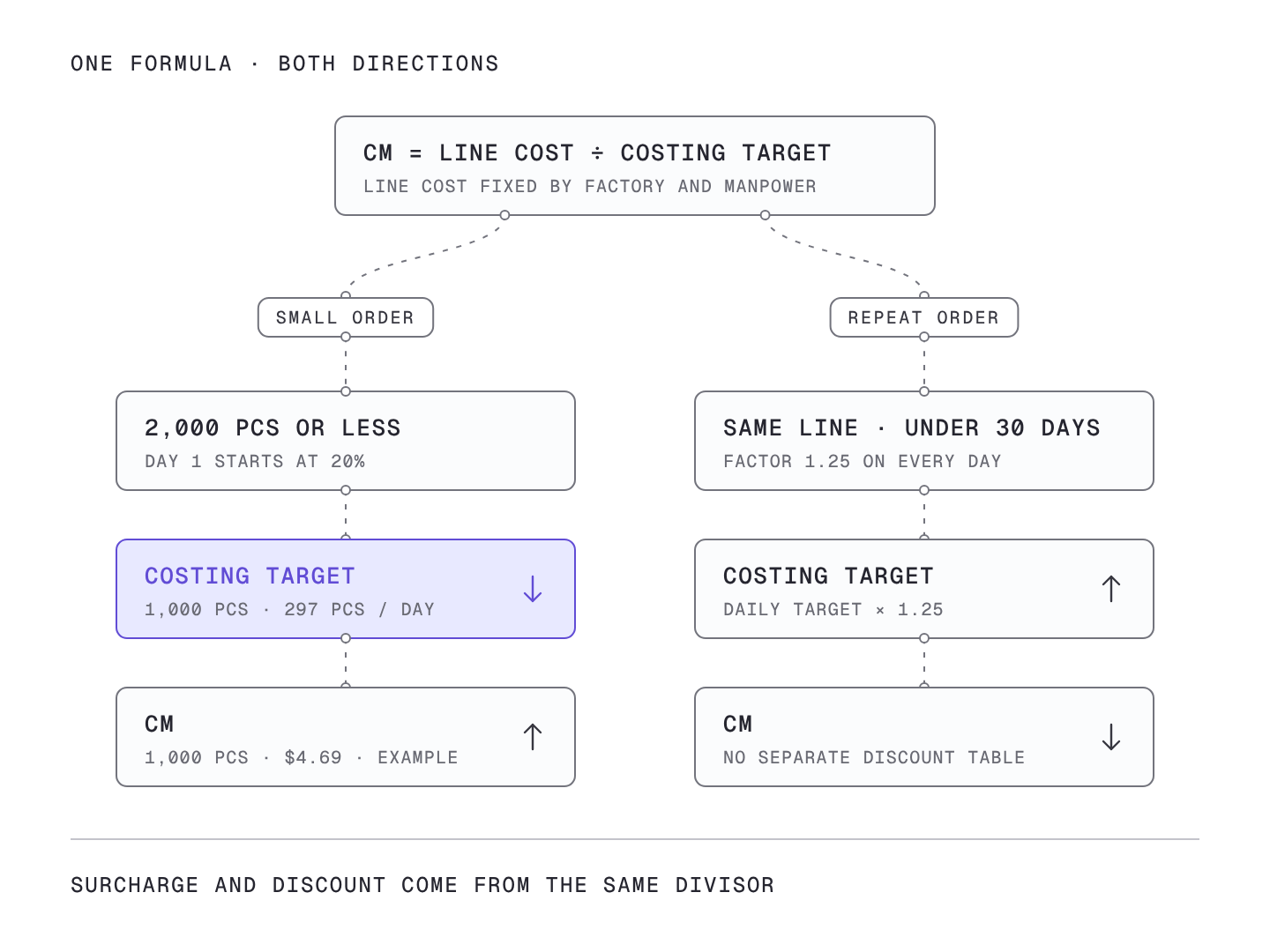
Dividing the same numerator by 297 gives a larger result than dividing by 424, and dividing by 516 gives a smaller one. A 1,000 pcs order spends most of its run in the loss zone, so its Costing Target drops sharply and its CM rises accordingly. A 10,000 pcs order has a long recovery period, so its Costing Target rises above the Production Target of 496 pcs and its CM actually goes down.
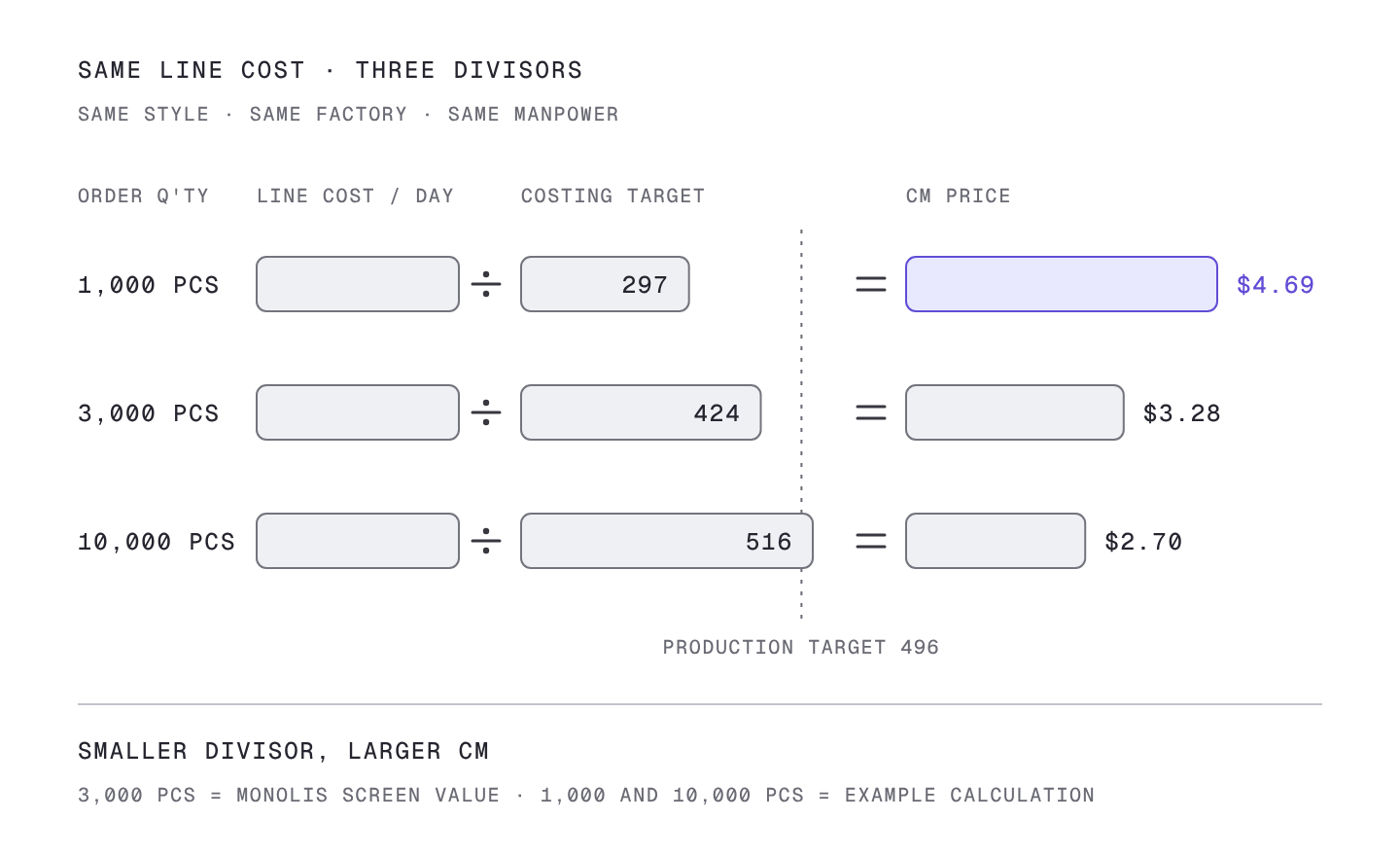
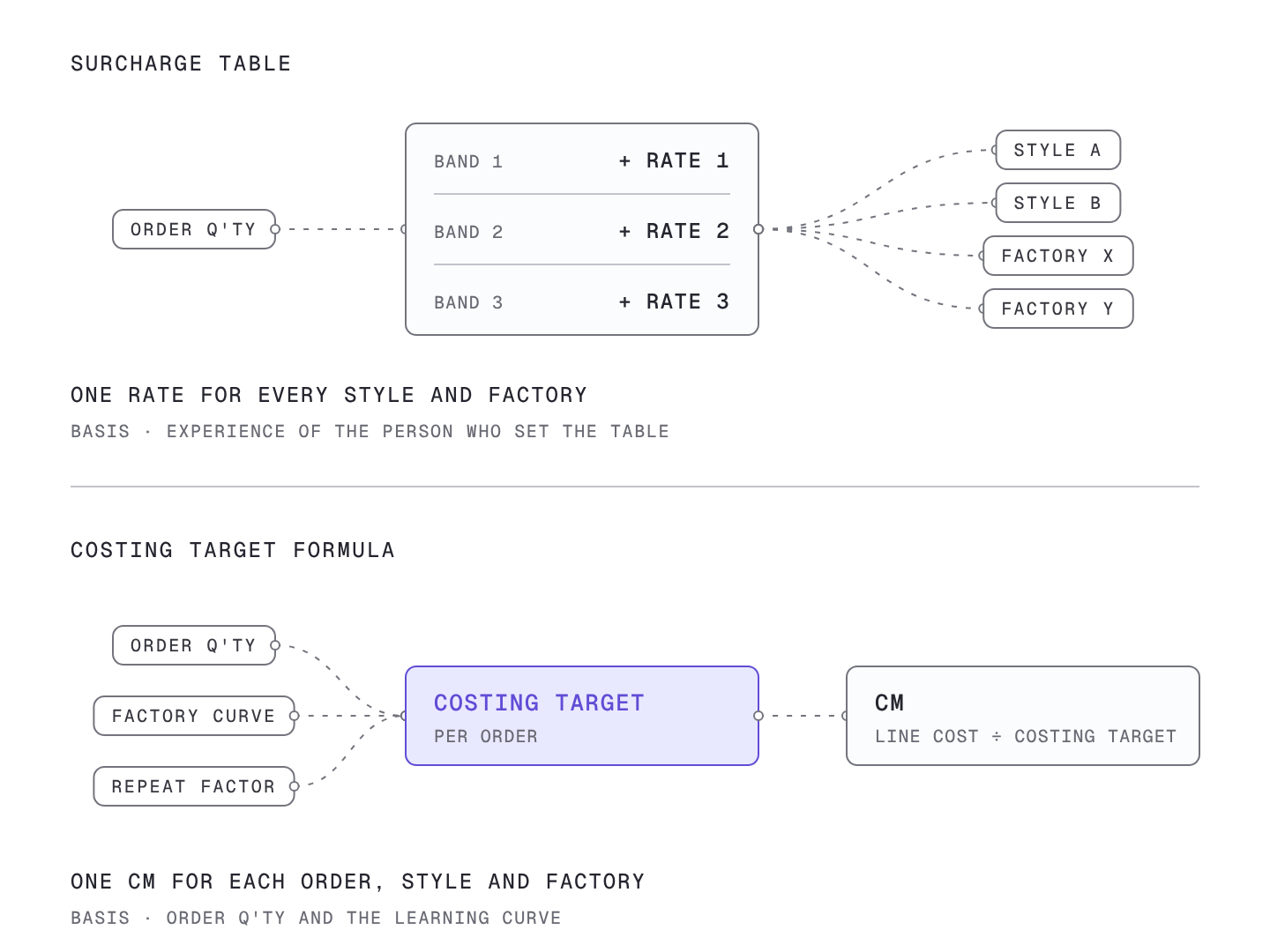
This is why no surcharge table is needed. The price increase for a small order does not come from a separately set rate. It comes from the Costing Target that the learning curve sets, and its size matches the share of days the order spends in the loss zone.
What changes when a formula replaces the surcharge table
First, the basis can be explained. When a buyer asks why the CM for a small order is high, you can show the curve instead of a rate: at this quantity, this many days of the order fall short of target, so the average output is this many pieces, and dividing the daily cost by that number gives this price.
Second, differences between styles and factories are included. A surcharge table puts the same rate on every style and factory. In the formula, a difficult style needs more people, which raises the numerator, and a factory that takes longer to get used to a style has a lower Costing Target, which shrinks the denominator. Even at the same 1,000 pcs, different styles and factories should produce different CMs.
Third, the opposite direction is handled by the same formula. The repeat order factor covered in Supplement 2 is an example. When the same style is produced again on the same line within a month, each day’s target is multiplied by 1.25, so the Costing Target rises, the denominator grows and CM goes down. A surcharge approach would need a separate discount table, while the formula handles both directions with one equation.
Where spreadsheets get stuck
This calculation can be done in a spreadsheet. SIJE’s process analysis spreadsheet in fact has a table of BEP and base manpower by factory, and a calculation sheet that returns CM once you enter the Costing Target and the manpower.
The sticking point is the Costing Target. It comes from a cumulative average built up day by day from the order quantity, the Production Target, the daily rate and the repeat factor. Every time the buyer changes the quantity at the quote stage, the quote is redone for another factory, or the order turns into a repeat order, that cumulative calculation has to start over. Skip it and divide by the Production Target, and the CM for small orders comes out lower than it should, which brings the surcharge table back to cover the gap.
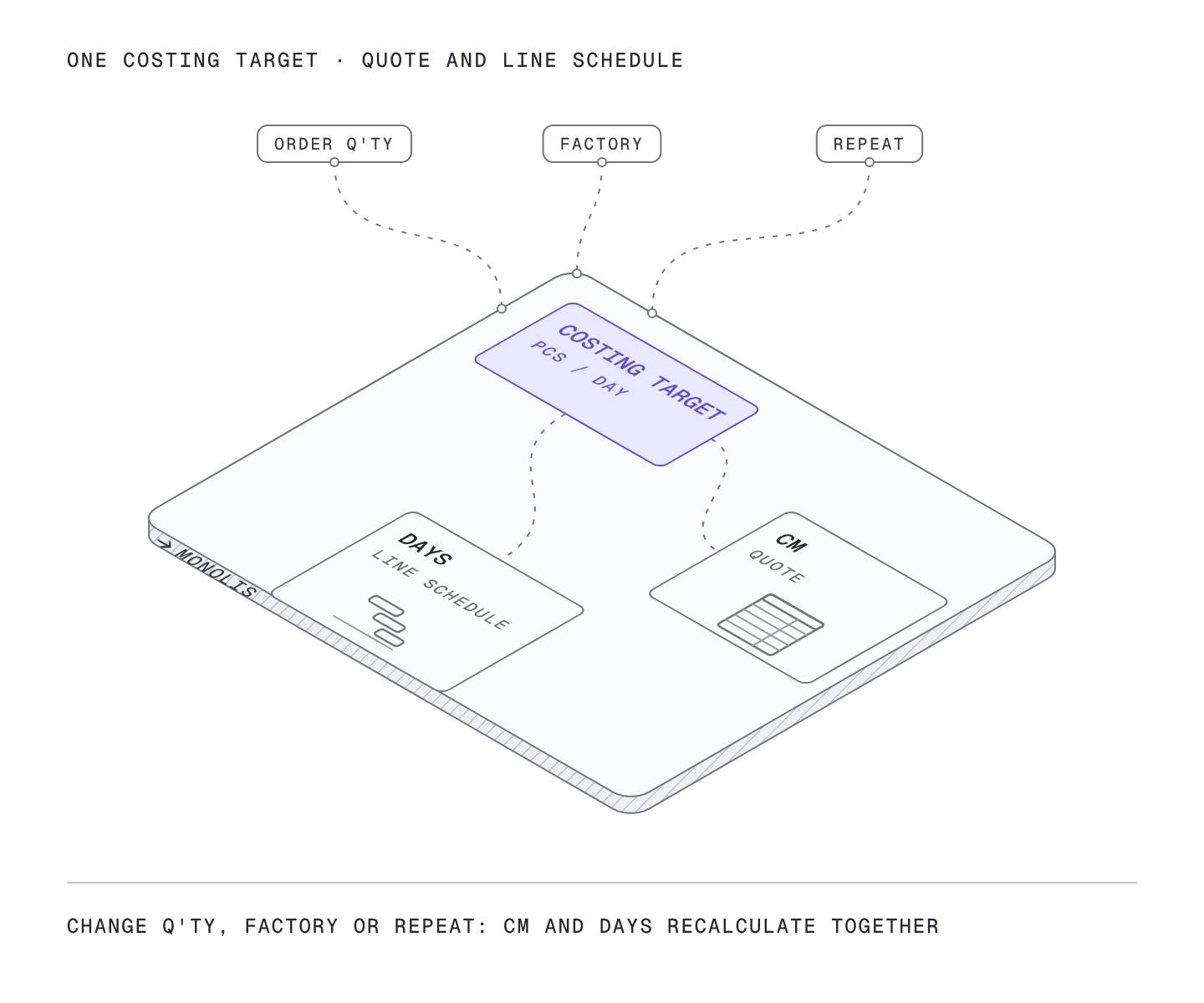
Monolis links the Production Target and manpower from the process analysis result, the factory BEP and the learning curve on one screen. The moment the order quantity or the factory changes, the Costing Target is recalculated and CM is recalculated from it. Because the price used in the quote and the production days used in the line schedule come from the same Costing Target, the quote and the schedule no longer work from different numbers.
Summary
| Item | Surcharge table | Costing Target formula |
|---|---|---|
| Price increase for small orders | A rate is set for each quantity band | The Costing Target drops and CM rises automatically |
| Basis for the size of the increase | Experience of whoever set the table | Order quantity and the learning curve |
| Style and factory differences | Same rate for all | Reflected in manpower (numerator) and the curve (denominator) |
| Repeat orders | A separate discount table | The repeat factor raises the Costing Target and lowers CM |
CM is the daily line cost divided by the Costing Target. The factory and manpower set the numerator and the style and order quantity set the denominator, so the price increase for small orders comes out of the formula with its basis, without a surcharge table.
