


When the Lowest Unit Price Is Not the Optimal Factory: Checking the Line Schedule First
AI Process Analysis series 5/6 · (5) When the lowest unit price is not the optimal factory
Key takeaways
CM differs by factory because each factory’s efficiency and labour rate go into the same operation breakdown, so the most efficient factory does not always carry the lowest unit price. A price table has no time axis, so before anything is confirmed the order is dropped into the line schedule for an OK, Needs Adjustment or Not Feasible verdict. The example order went to the factory with the certain delivery date rather than the one with the lower unit price.
What I did as a sourcing person was simple. Send the same tech pack to several factories, paste the prices that came back into a spreadsheet, and highlight the cell with the lowest unit price in yellow.
The trouble starts after that. A month later you call to place the order and hear that the lines are full for that window. So you call the next factory down the list. By then the fabric has already been ordered.
Price is half of a quote. The other half is whether that factory can actually take that order in that window. Every screen and figure here is example data, from order DR-2026-001, 3,000 pcs, first delivery cargo date 2026.08.11.
One breakdown, a different price at every factory
The operation breakdown is an attribute of the style. The 48 ea, SMV 1,505 sec and Takt 48 sec from the earlier posts are the same wherever you take them. What changes by factory is the efficiency that turns that breakdown into actual output.
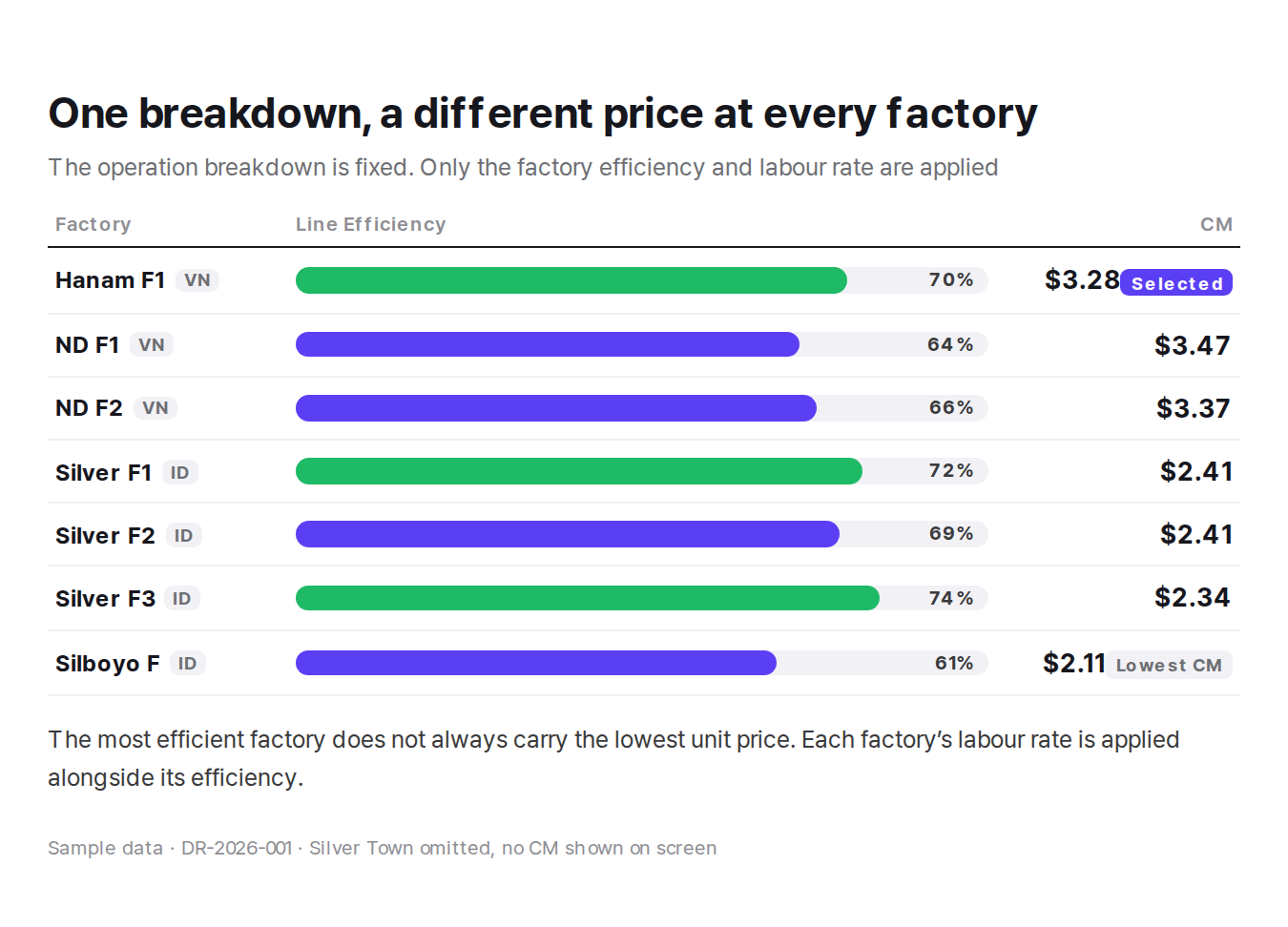
Select a factory and its target output, required headcount and CM are calculated together. On the example screen, selecting Silver F3 returns Production Target 496 pcs, Optimal Manpower 45, Line Efficiency 74 and CM Price $2.34.
Read down the table and one thing stands out. The most efficient factory does not always carry the lowest unit price. Silboyo F runs at 61% and comes out at $2.11, while Silver F3 runs at 74% and comes out at $2.34. Each factory’s labour rate goes in alongside its efficiency. A high-efficiency factory and a factory with a low unit price are two different things.
What the price table leaves out
Read only this table and the conclusion looks simple. Select the factory with the lowest unit price.
Except the table has no time axis. The condition that 3,000 pcs has to be finished before the delivery cargo date of 2026.08.11 is nowhere in it. A price table answers how much, not when.
On the floor, the gap always shows up late. After the quote goes out, after the buyer confirms, after the fabric is committed, when someone asks for a line assignment. Hearing there is no line at that point leaves three options. Push the delivery date, reassign it at short notice to a higher-priced factory, or cover it with overtime.
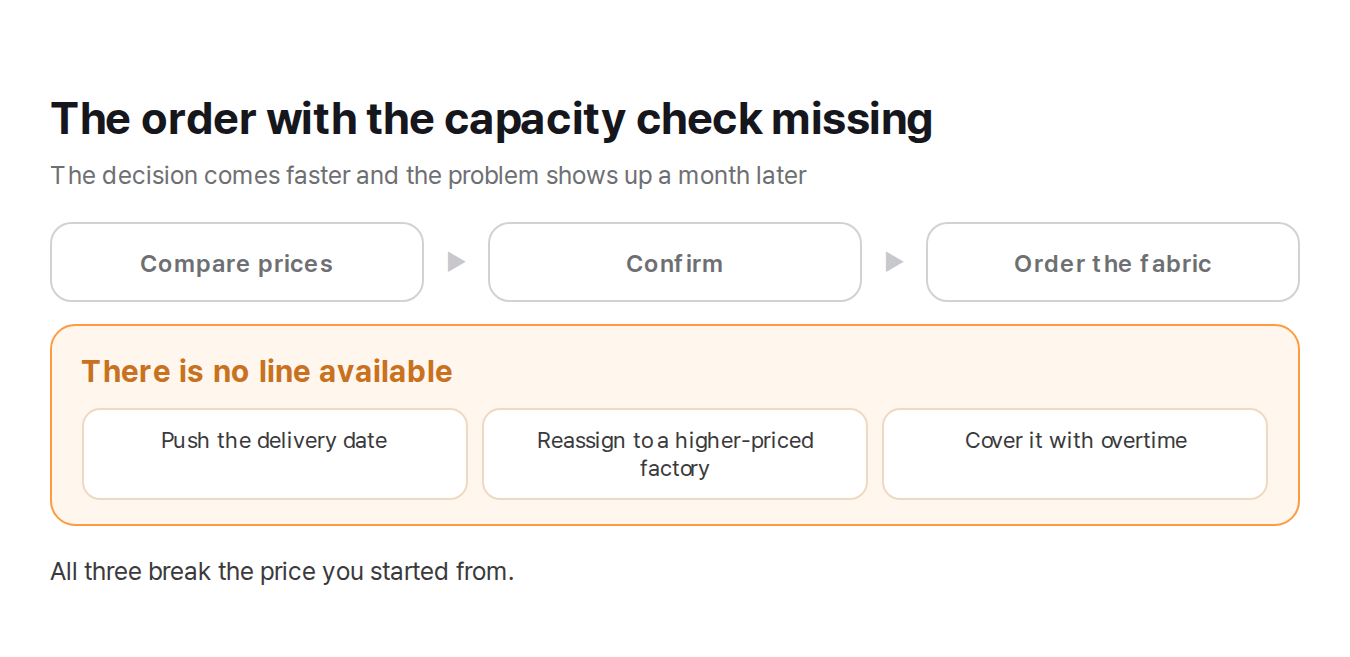
All three break the price you started from. As the last post showed, covering it with overtime changes the assumption about available hours, and once the hours move, Takt and cost move with them.
Drop the order into the line schedule first
Once the candidate factories are in the cart, this is what happens before anything is confirmed. The order is placed into that factory’s line schedule as a test.

The Line Capacity Check on the example screen judges two factories against DR-2026-001 · 3,000 pcs · Est. 7 days · 1st DCD 2026.08.11. Hanam F1 · Vietnam comes back OK, Silver F3 · Indonesia comes back Needs Adjustment.
The verdict carries its basis. For Hanam F1 that is Assigned Line 3, Production Jul 29 to Aug 5, 2026, 7 working days, delivery cargo date 2026.08.11. The screen puts it in a sentence.
“DR-2026-001 fits into Hanam F1 before the 1st DCD.”
Which line, from which date to which date, for how many days, all on one screen. With that much you can call the factory and ask them to hold Line 3 from July 29. That is a different conversation from asking when they might have room.
Three verdicts and what follows each

OK. It fits an open slot between existing orders and finishes before the delivery cargo date. Tell the factory the line and the dates, and send the confirmed CM through to the cost sheet.
Needs Adjustment. It fits, but not as it stands. The start date has to move, the line has to be split, or the sequence against another order has to change.
Not Feasible. There is no slot in that window. Look at the other candidates or renegotiate the delivery date.
So where did it go
In the example data this order went to Hanam F1. The sewing factory on the cost sheet is Hanam F1 and the confirmed CM is $2.95.
On price alone Silver F3 was lower at $2.34. But Silver F3 came back Needs Adjustment. Whether to take on the time and risk of that adjustment, or to go where the delivery date is certain, was a call a person made.
This is not an argument for excluding factories with a low unit price. It is an argument for knowing when they can be deployed. A factory that came back Needs Adjustment is the first candidate for the next order. The reason the adjustment was needed is still on the screen, so next time the schedule can be built around that window.
Putting the order right
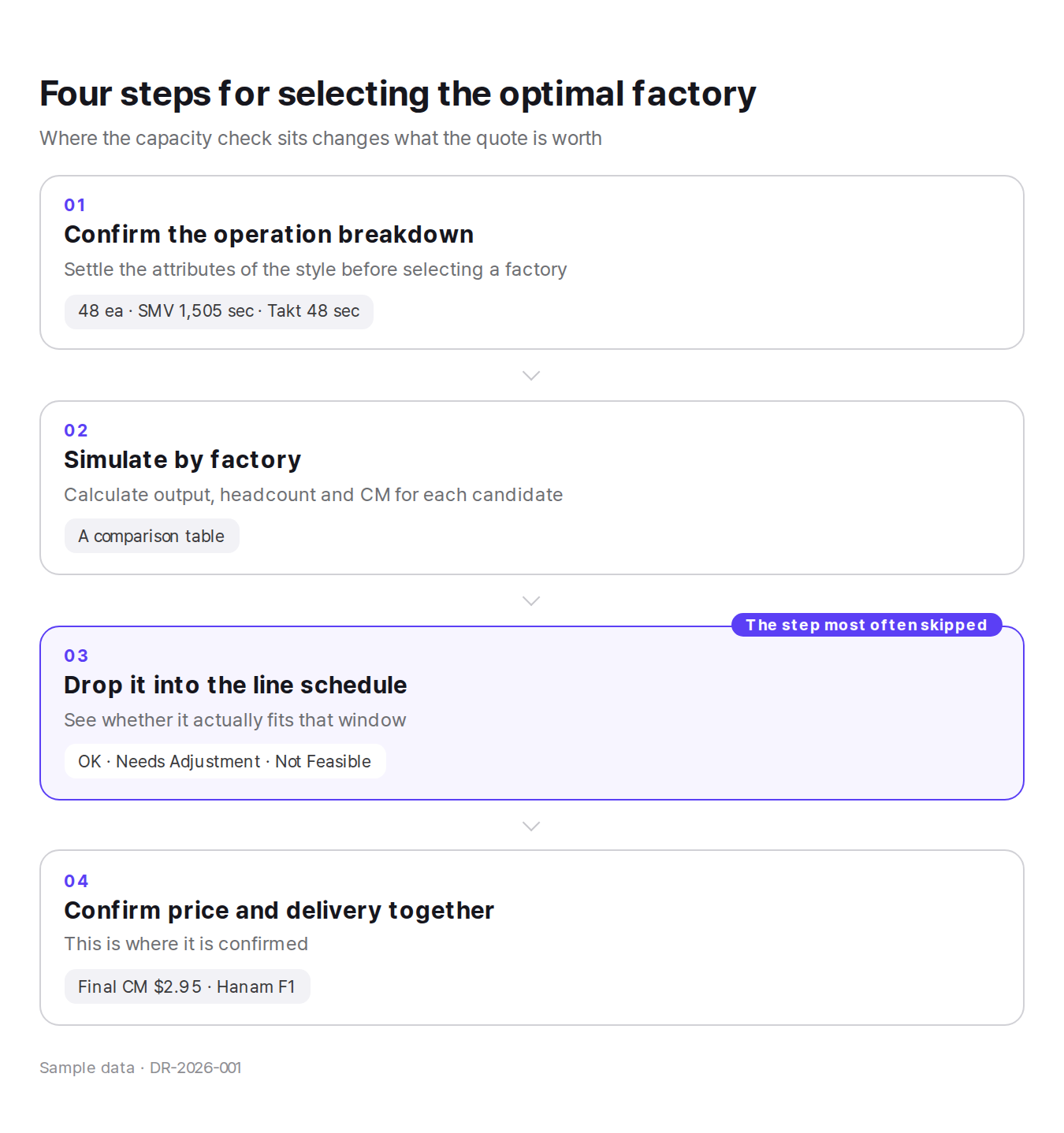
Confirm the operation breakdown first. The attributes of the style have to be settled before a factory is selected, or the comparison that follows means nothing. Then check output, headcount and CM for each candidate and put them in the cart. What comes out of that step is a comparison table, not a decision.
Third comes the schedule test. Run the capacity check on the candidates and take the OK, Needs Adjustment or Not Feasible. Only then confirm, with price and delivery on the same screen.
The wrong order is the one where the third step goes missing between the second and the fourth. The decision comes faster, and the problem shows up a month later.
Factory selection is a decision about time, not price
The spreadsheet I used to highlight in yellow was short one column. If there had been a “when” next to the price, half the phone calls I made in those years would not have happened.
Put unit price and delivery on the same screen and the meeting gets shorter while the decision lasts longer.
| Verdict | What it means | What follows |
|---|---|---|
| OK | Fits an open slot, finishes before the delivery cargo date | Tell the factory the line and dates, send the CM on |
| Needs Adjustment | It fits, but not as it stands | Move the start date or split the line, log it for next time |
| Not Feasible | No slot in that window | Check other candidates, renegotiate the date |
Previous: Why the First Week Loses Money: Putting the Learning Curve into the Quote
Next: How Far to Trust an AI Draft: Five Lines You Check Yourself
The next post closes the series: how far to trust an AI draft, and what you check yourself every time.
