

One Tablet per Sewing Cell: Data Collection Designed for a Small Line

Smart factories for small sewing factories 2/3 · (1) Why Smart Factory Systems Did Not Fit Small Sewing Factories · (2) One Tablet per Sewing Cell · (3) How a Small Sewing Factory Adopts a Smart Factory Through a Government Support Program
KEY POINTS
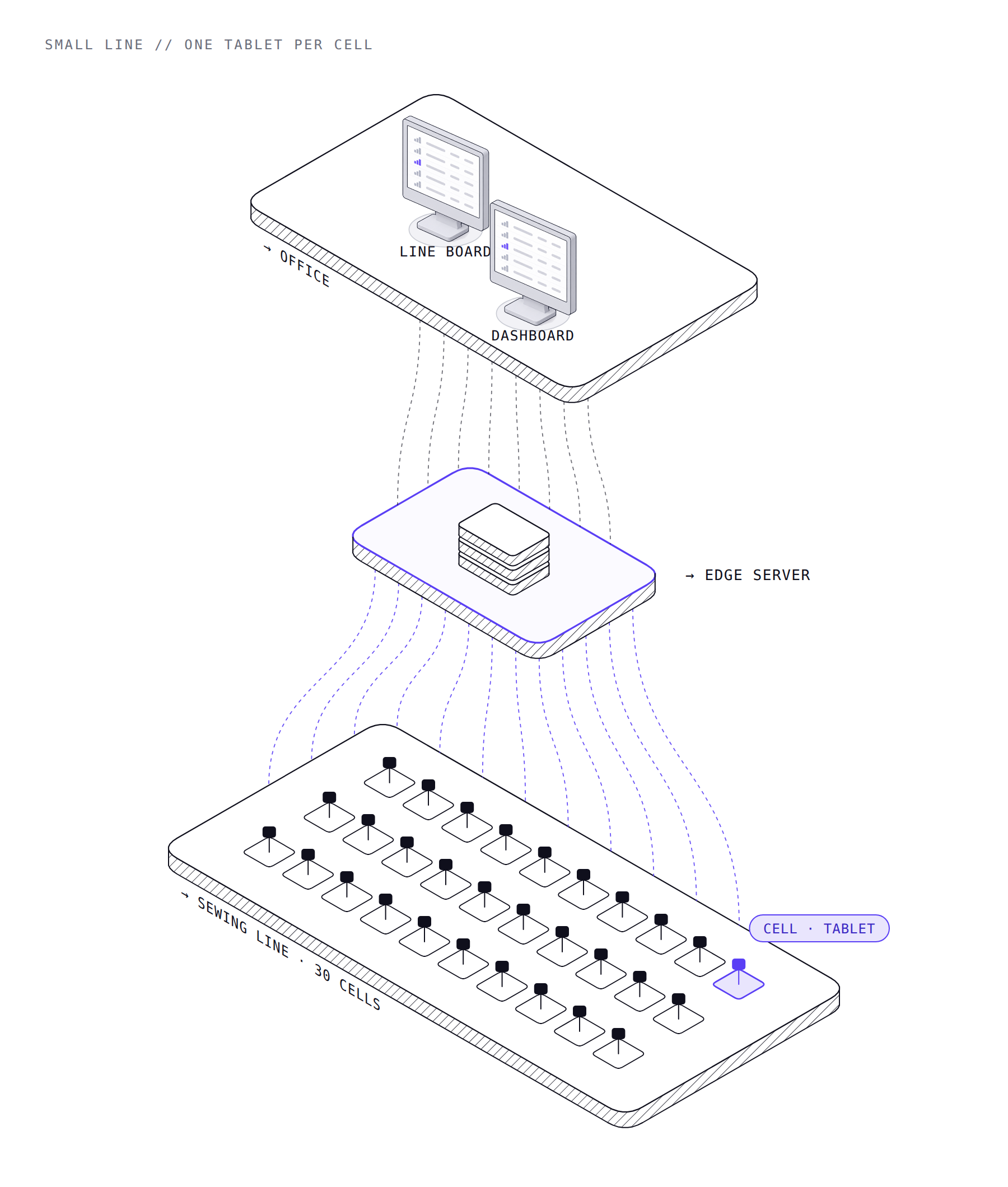
A small sewing line needed a design with fewer types of equipment. SIJE reduced the three types of equipment used in the PoC to one type, a 10-inch tablet, and planned 30 of them, one at each sewing cell. The tablet camera reads only the joint positions of the hands and upper body and deletes the original footage within 500ms. The collected values are used to predict bottlenecks 1~5 hours ahead and to propose 3 operator reassignment plans, and the supervisor decides which plan to use.
Part 1 covered the two tasks the five-week PoC left open. Three types of equipment were hard for a small factory to look after, and counting quantity alone could not tell what the working time was made of. This post covers the design changes made to solve both. The build is in progress, so what is written here is the design and the target criteria.
Three types of equipment into one tablet
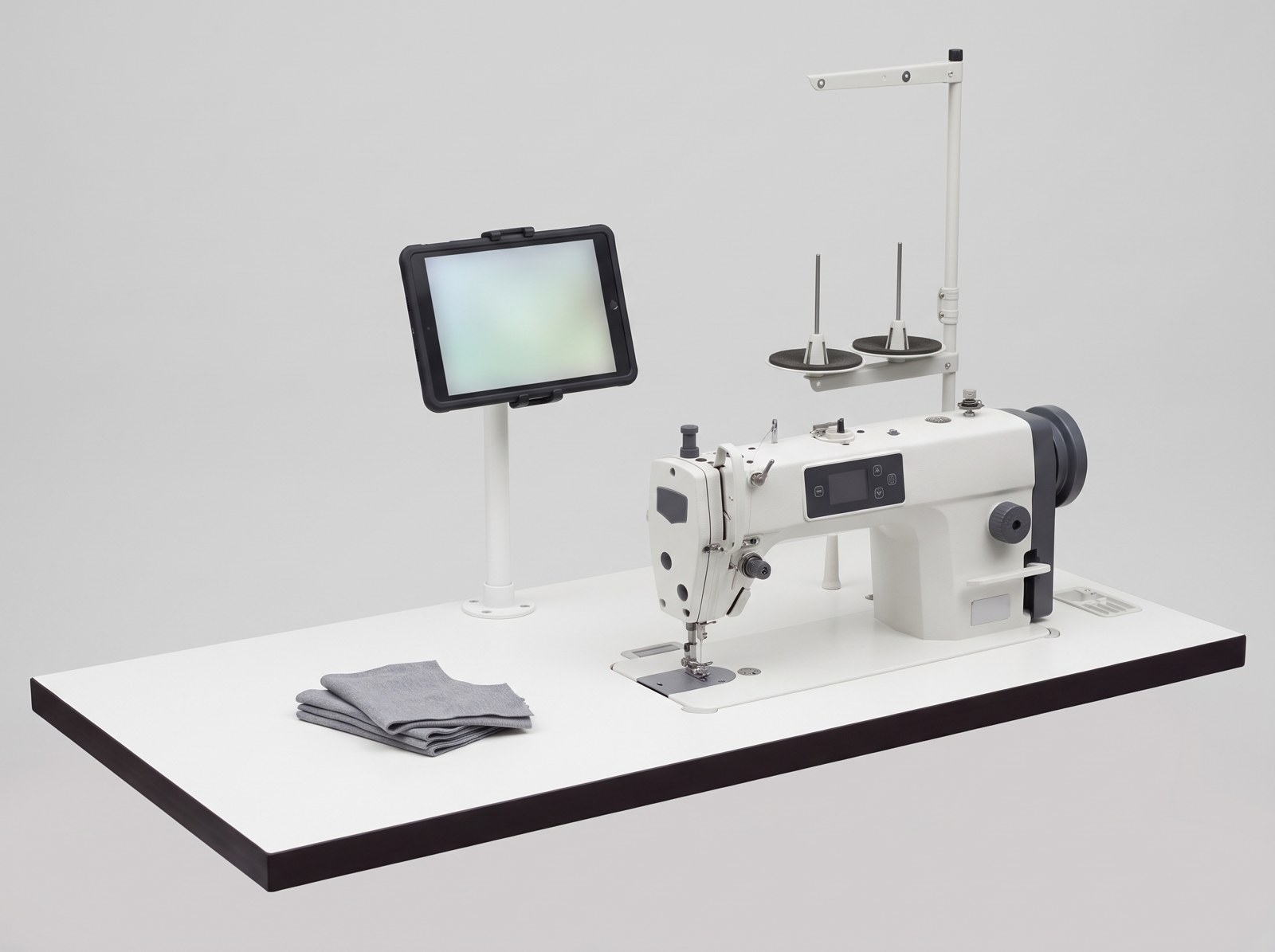
In the PoC each sewing cell was fitted with a counter, an andon lamp and a pressure pad. For the main build we combined the three into one type of device, a 10-inch industrial tablet.1
| Item | Details |
|---|---|
| Placement | 1 per operation on a 30-cell line, 30 in total |
| Installation | Articulated mount next to the sewing machine, about 2 minutes per cell |
| Power | No battery, a dedicated outlet per cell |
| Screen | 10 inches |
| Camera | 1280×720, 30 fps |
Tablet setup1
The tablet stands beside the sewing machine without touching it, so the existing machines do not have to be modified. With no battery, there is no charging or replacement to keep track of. Each cell does need a dedicated outlet prepared in advance.
What the tablet reads
The tablet camera does not store the work scene as video. It extracts only the positions of a person’s joints from the footage, as points. It reads 33 body joints such as shoulders, elbows and wrists and 42 finger joints on both hands, about 75 points per frame.2
Following how the points move over time shows when one cycle of work started and when it ended. Three values come out of this.
- Cycle time: the time one cycle of work took
- Units Per Hour (UPH): the quantity finished in one hour
- The ratio of value-added to non-value-added work (VA/NVA)
Value-added work (VA) is the time in which the product is actually being made, such as when the needle is stitching the fabric. Non-value-added work (NVA) is the time spent picking up fabric, aligning it or waiting. The counter in Part 1 only reported that one piece was finished. Reading joint points shows how the two kinds of time are split inside that one piece.
The original footage is not kept
Putting a camera on a sewing floor is a sensitive matter for operators. So we set the processing order to keep footage from leaving the tablet.3
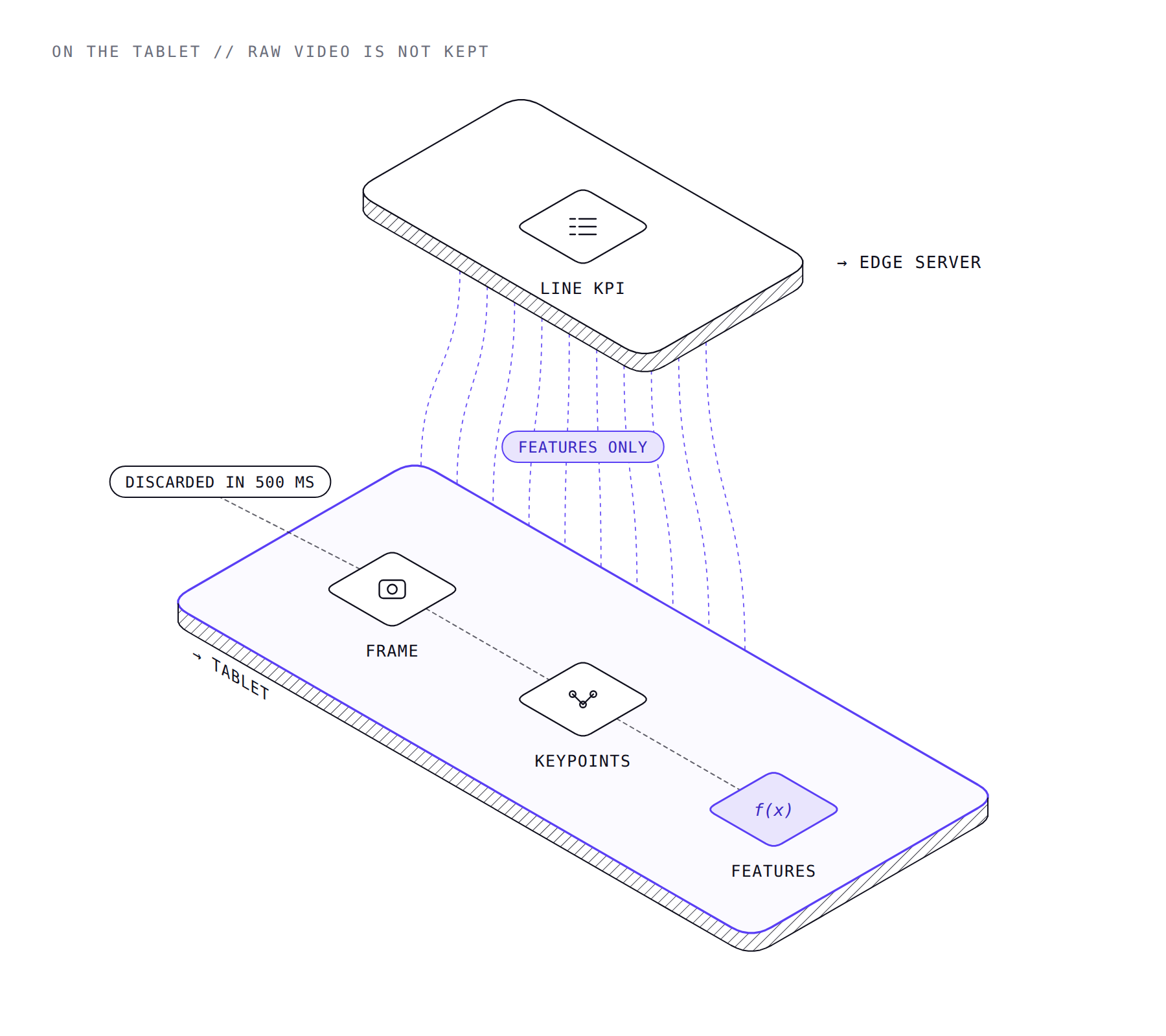
- The camera receives a frame.
- Joint points are extracted inside the tablet.
- Feature values are calculated from the joint points.
- The original frame is deleted within 500ms.
- Only the feature values are sent to the edge server on site.
The edge server groups the values it receives into line-level indicators and stores them. Personally identifiable information such as faces and body shapes is neither stored nor transmitted. The camera angle is also fixed toward the worktable so that faces stay out of the frame.
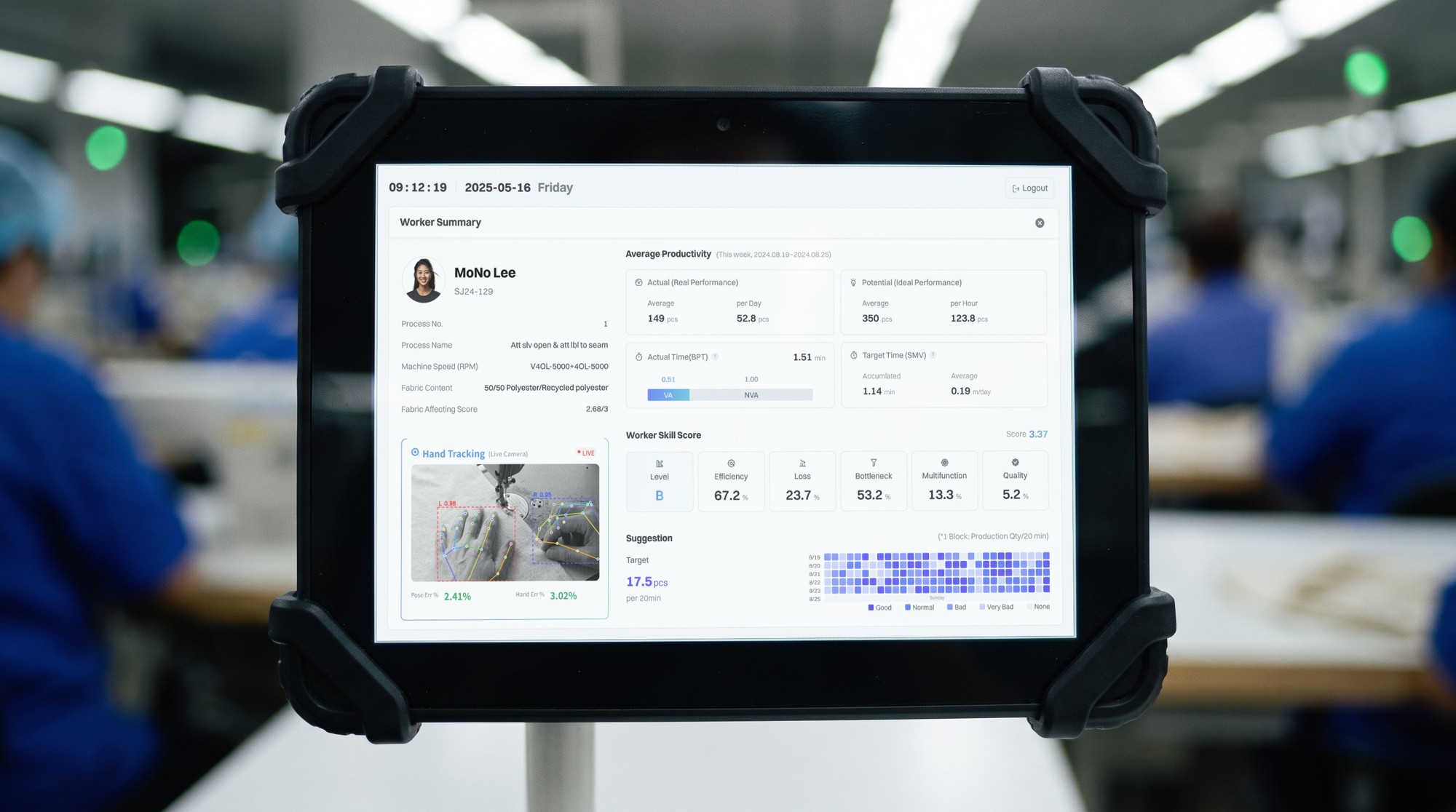
What the operator taps
The tablet is a tool the operator uses directly. It is not used as surveillance equipment. Operators enter input, completion and quality in 3 taps or fewer. Operators can check the collected values for themselves on the screen.3
The rules set for keeping a camera on the floor
Technical measures alone were not enough, so we set operating rules as well.3
| Rule | Details |
|---|---|
| No faces | The camera is fixed toward the worktable so faces are outside the field of view |
| Break time | The camera turns off automatically during lunch and breaks |
| Right to refuse | Operators who object use touch input only, without motion recognition |
| Skill score | Managed by anonymous operator number only, with the work rules stating it is not used for personnel evaluation or discipline |
| Prior steps | A privacy impact assessment and consultation with the employee representative before work starts |
Camera operating rules3
Where the collected values are used
The cycle time and output collected at each cell are used for two things.4
One is bottleneck prediction. It looks at the flow of the line and reports in advance which operation will be blocked 1~5 hours later, with the expected time and 3 candidate causes.
The other is line balancing proposals. When a bottleneck is expected, it produces 3 plans for reassigning operators. The relation between bottlenecks and operator assignment is explained in What Man Power 0.5 Means: Three Ways to Break a Bottleneck.
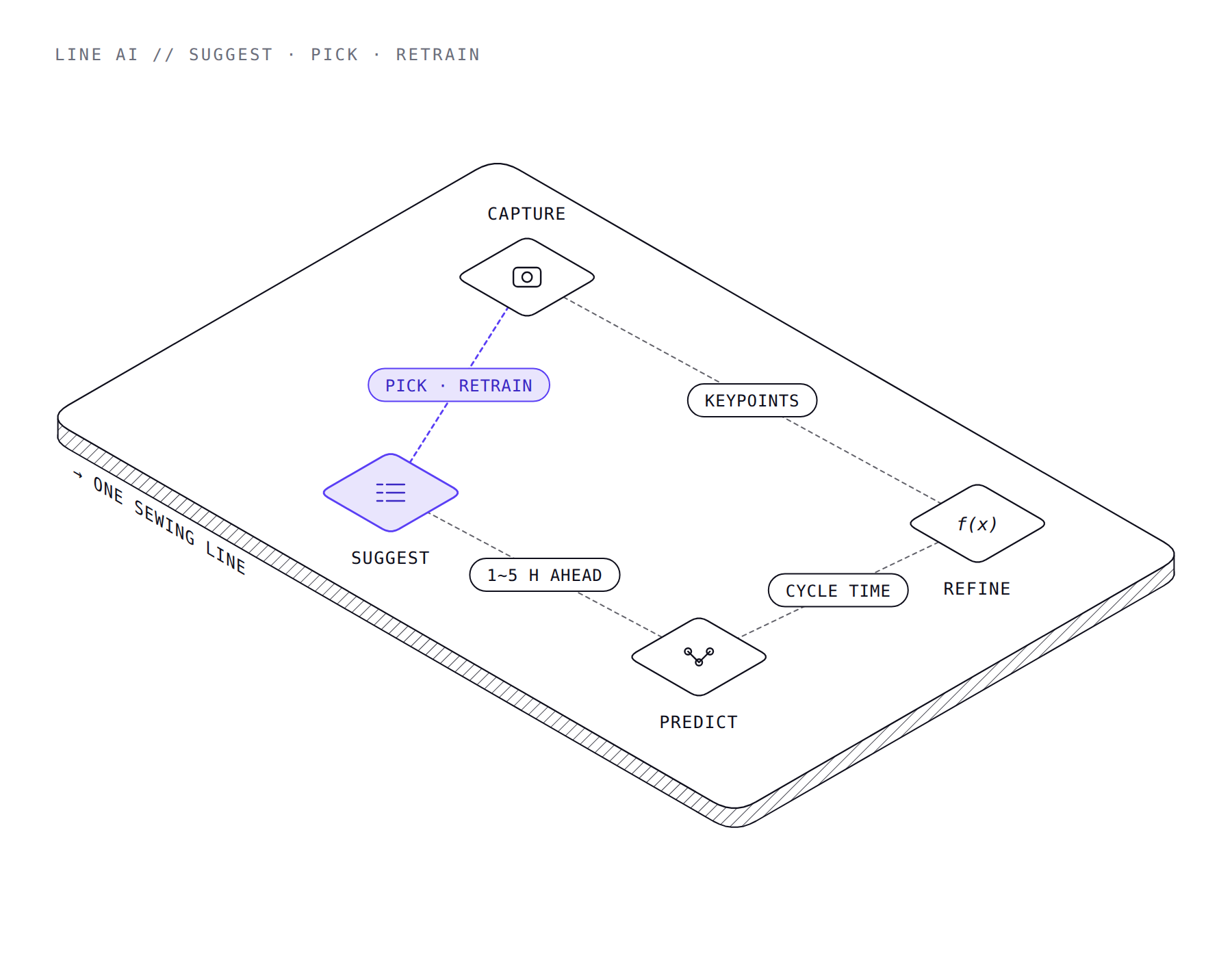
The production supervisor decides which plan to use. The system goes as far as the proposal, and a person carries it out. The plan the supervisor chose and its result are recorded, and the prediction model is retrained every month on these records. The structure is meant to make the proposals fit that factory’s circumstances better over time.
The target criteria are a motion recognition accuracy of 90% or higher and a bottleneck prediction accuracy of 85% or higher.4 Both are targets, to be verified on site against manual measurements once the build is finished.
Wrapping up
The design for a small line comes down to three points: the equipment was reduced to one type of tablet, joint points are read in place of video so no original footage is kept, and the supervisor decides which plan to use. Once the build is finished we will write up the installation process and the measured results separately.
Sewing production glossary
- Sewing cell: a work position where one sewing machine and one operator handle one operation.
- Cycle time: the time it takes to finish one cycle of work at an operation.
- Units Per Hour (UPH): the quantity finished in one hour.
- Value-added and non-value-added work (VA/NVA): the time in which the product is actually being made, and the rest of the time.
- Edge server: a small server kept inside the factory. It first gathers the values from the tablets and processes them by line.
- Line balancing: assigning operators and machines according to the time each operation takes.
👉 Why Smart Factory Systems Did Not Fit Small Sewing Factories
👉 How a Small Sewing Factory Adopts a Smart Factory Through a Government Support Program
References
- SIJE internal material, Monolog 2nd generation technical specification. Reason for consolidating the equipment, tablet quantity and placement, installation method, power, screen and camera specifications. ↩
- SIJE internal material, Monolog 2nd generation recognition model specification. 33 pose joint points and 42 joint points on both hands, and the indicators produced. ↩
- SIJE internal material, privacy protection design. Time to discard the original frame, transmission of feature values, line-level aggregation, camera angle, operator input method, break time handling, handling of operators who object, limits on use of the skill score, and prior steps. ↩
- SIJE internal material, AI function definition and performance targets. Range and output of bottleneck prediction, number of reassignment plans, the principle that the supervisor chooses, monthly retraining, accuracy targets and the verification method. ↩
